Local outreach involves more than a list of business names. The owner may be out, a manager may suggest a better time to visit, or a useful conversation may need a follow-up next week. We wanted a tool that keeps that context close to the next action.
Project write-up · 7 November 2026
A small CRM for work that happens locally.
The starting point was our own business outreach: saving a place, remembering the people we met and keeping track of progress. A map makes the local context visible; a contact history means the next conversation can pick up where the last one ended.
This pattern can suit a sole operator visiting nearby businesses, a service provider developing referral relationships, or someone managing a small prospect list. Our version has a single administrator. It records activity and follow-up dates; it does not send outreach emails, discover businesses automatically, plan routes or run a calendar reminder service.
Some fields reflect our workflow, including whether a commission scheme has been explained and whether business cards are on display. Another business could replace those with its own meaningful milestones.
Find the business. Remember the conversation.
Add a prospect, place its pin and save a name. Other details can follow. The sidebar and map share the same filtered records, so searching for a business or contact, choosing a sales stage, or showing due follow-ups changes both views together.
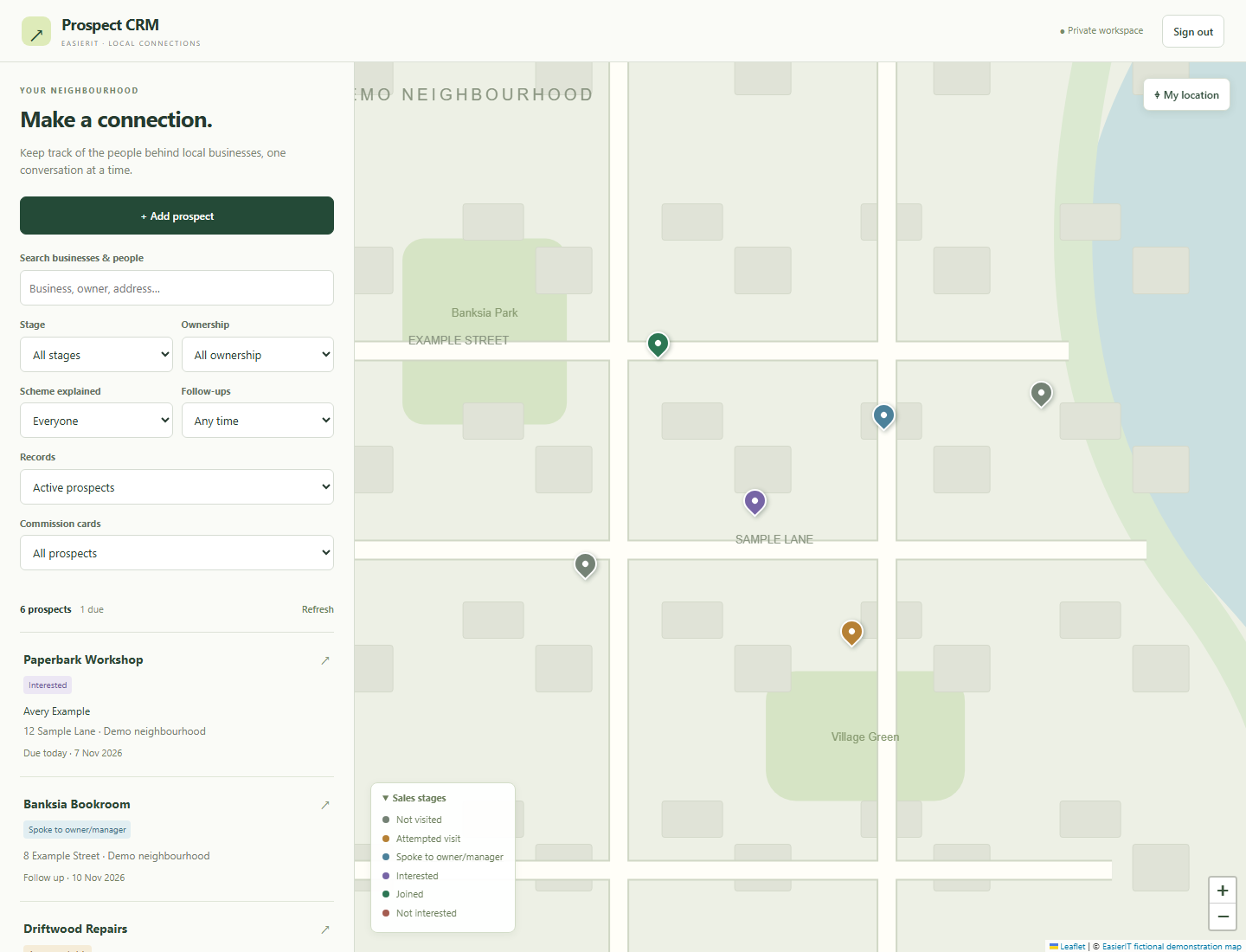
The stages run from Not visited through Attempted visit, Spoke to owner/manager, Interested, Joined and Not interested. Ownership confidence is a separate field: speaking to someone does not automatically establish that the business is owner-operated.
Open a prospect to see its contacts, conversation history and next action. A visit or call can update the stage and follow-up together. Marking a business as Joined is a manually recorded outcome, not an account registration or a completed partner agreement.
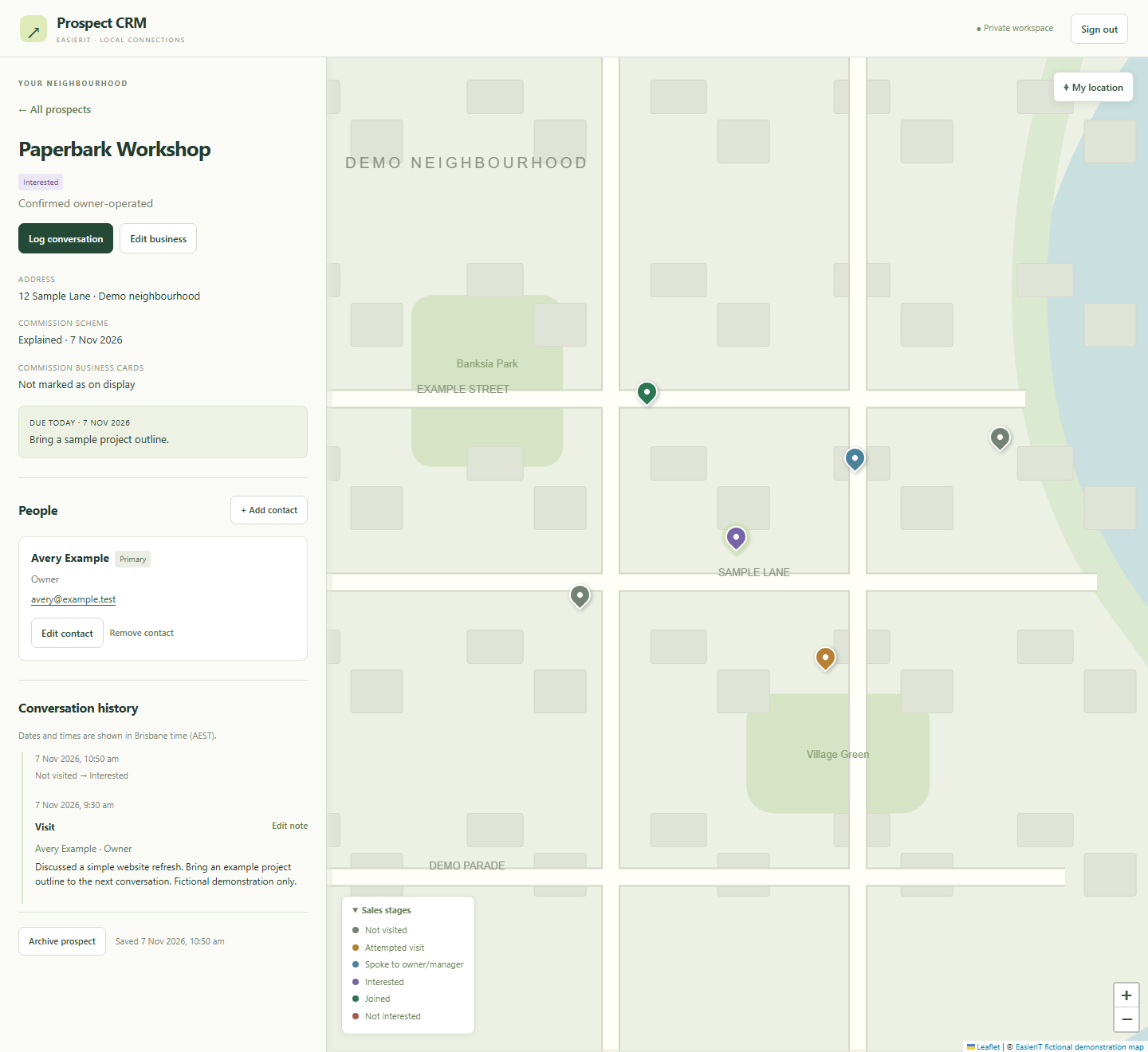
Follow-ups use Brisbane dates, with due and overdue filters. On smaller screens, the list and map switch between views. Archiving keeps the record and its history available to restore later.
One set of records, two useful views.
A Vue application owns the filters, selected business and edit forms. Leaflet displays the map and markers. PHP handles authentication, validation and database transactions; SQLite stores the business records. Both map and list render the items returned by the same query. Panning the map does not silently change the prospect list.
| Record | What it holds |
|---|---|
prospects | Business name, coordinates, address, category, contact details, notes, stage, ownership confidence, milestones, follow-up date/action, archive state and revision. |
contacts | Many people per prospect, with name, role, phone, email and notes. At most one primary contact per business. |
activity | Visits, calls, emails, notes and stage changes. Includes UTC timestamps and snapshots of the contact’s name and role at the time. |
A separate table throttles failed logins. The CRM has its own configuration, database and authentication cookie; it does not use the analytics database or put a recorder on private CRM screens.
Preserve history and unfinished work.
Every change supplies the business’s current revision. The server checks it inside a transaction, applies the change and increments the revision. If another tab saved first, the API returns a conflict instead of overwriting that newer work.
Failed saves and expired logins keep the draft in memory. Reloading the latest version asks before discarding it. Drafts do not survive closing or reloading the tab, so leaving with unsaved work produces a warning. After a network timeout, the user may need to check whether the save completed before retrying.
Activity stores the name and role as they were when the conversation happened. Editing or removing a contact does not rewrite that history. Correcting an old note changes its wording without applying the old sales outcome again.
Keep the map useful and the records private.
The working application uses Leaflet with OpenStreetMap tiles and visible attribution. Tile requests send the viewed map area and viewer IP to the provider, but not prospect names, contacts or conversation notes. Our screenshot capture substitutes an illustrative local map so the demonstration can run without external requests.
Location access happens only when the user selects My location. Denying it leaves manual navigation available. If tiles fail, the list, saved records and editing still work; an internet connection to the CRM server is required to save.
The application requires administrator login, uses HttpOnly session cookies scoped to the CRM, and checks origin and CSRF tokens on writes. Configuration, credentials and SQLite files live outside the public document root. Search filters and the map view can persist in session storage; contacts and drafts do not go there.
This is designed for a modest local prospect list, with all matching lightweight records returned together. A larger or multi-user CRM would need an explicit access model and a different loading strategy. Those are extensions to plan, rather than features to assume are already present.
Build something similar.
Our development stack uses Node 22.12+, Vite, Vue 3 and Leaflet 1.9.4. Production needs PHP 8.3+ with PDO SQLite and sessions, plus HTTPS. Compile the browser assets once; no Node server is needed to handle CRM requests.
Separate the public shell, compiled assets and API entrypoint from the private runtime, configuration, database, sessions and backups. Build the basic business/contact/history workflow before adding more CRM features.
Keep list and map results together
This illustrative frontend fragment assumes an authenticated session, a Leaflet map, a marker layer and a Vue items ref. Create those once; give the map container an explicit height and load Leaflet’s CSS.
import L from 'leaflet';
import 'leaflet/dist/leaflet.css';

async function refreshProspects(filters) {
  const query = new URLSearchParams({
    action: 'prospects', ...filters
  });
  const response = await fetch(`/crm/api.php?${query}`, {
    credentials: 'same-origin', cache: 'no-store'
  });
  if (!response.ok) throw new Error('Could not load prospects.');
  const result = await response.json();

  items.value = result.items; // The sidebar uses this same array.
  markers.clearLayers();
  for (const prospect of items.value) {
    const label = document.createElement('span');
    label.textContent = prospect.name; // Never interpolate HTML.
    L.marker([prospect.latitude, prospect.longitude])
      .bindTooltip(label)
      .on('click', () => selectProspect(prospect.id))
      .addTo(markers);
  }
}
A complete implementation also guards against out-of-order search responses, preserves the selected record, and shows an error state without losing drafts. Pin placement should occur only while adding or editing a business.
Save the conversation and its outcome together
The following is a representative authenticated request body for POST /crm/api.php?action=activity. Replace the example IDs, revision and dates with values from the selected record. Send JSON with the current session’s X-CRM-CSRF token.
{
  "prospect_id": "<selected-prospect-id>",
  "revision": 3,
  "contact_id": "<selected-contact-id>",
  "kind": "visit",
  "occurred_at": "2026-11-07T09:30:00+10:00",
  "notes": "Discussed a website refresh. Bring an example outline.",
  "changes": {
    "stage": "interested",
    "followup_date": "2026-11-10",
    "followup_action": "Bring a sample project outline."
  }
}
The transaction checks the revision, snapshots the selected contact, inserts the activity, applies the outcome, records any stage change and increments the revision. Return the updated detail on success. On 409, keep the draft and offer an explicit reload; on 401, retain it while asking the user to sign in again.
Action on api.php | Responsibility |
|---|---|
GET authPOST login / logout | Session and CSRF handling; throttle failed logins. |
GET settings / prospects / detail | Authenticated map settings, filtered records and one business with contacts/history. |
POST save / archive | Create/update a business or archive/restore it. Existing records require their current revision. |
POST contact / remove_contact | Maintain people and the primary contact while preserving historical snapshots. |
POST activity | Log a conversation and optional outcome atomically, or correct an existing note. |
Read the building blocks
- Leaflet source and 1.9.4 API reference — maps, markers, events and tile layers.
- Vue guide — reactive filters, forms and selected records.
- PHP PDO SQLite documentation — prepared queries and transactional writes.
- OpenStreetMap tile usage policy — attribution, caching and responsible tile use.
A brief you can give your LLM.
Use this page as the reference and adapt the milestones to your own business. The brief and examples describe a rebuild; the complete EasierIT application source is not distributed here.
Build a private, single-administrator CRM for local business outreach.
Reference: https://easierit.com.au/prospect-crm.html

Use Vue 3 and Vite for the UI, Leaflet 1.9.4 for mapping, PHP 8.3+ with PDO SQLite and sessions for the API. Node 22.12+ is for builds only.
Sources: https://github.com/Leaflet/Leaflet
https://leafletjs.com/reference-1.9.4.html
https://vuejs.org/guide/introduction.html
https://www.php.net/manual/en/ref.pdo-sqlite.php
Map policy: https://operations.osmfoundation.org/policies/tiles/

Build in stages:
1. Separate public shell/assets/API from private runtime, configuration, database, sessions and backups. Implement a password-hashed administrator login, throttling, 12-hour authentication expiry, HttpOnly/SameSite cookies scoped to the CRM, and origin/CSRF checks for JSON POST writes. Do not install analytics or advertising trackers on private screens.
2. Model prospects (name, coordinates, address/category/contact details, notes, best visit time, stage, ownership confidence, milestone flags/dates, follow-up date/action, archived flag, revision and timestamps); contacts (many per prospect, at most one primary); activity (type/time/notes, contact ID and historical name/role snapshot, stage transitions). Use foreign keys and transactional migrations.
3. Provide authenticated settings, prospects and detail reads; save, archive/restore, contact, remove_contact and activity writes. Detail returns prospect, contacts and activity. Every existing-record mutation checks and increments the parent prospect revision atomically. Return 409 for stale revisions without overwriting newer data.
4. Build a filterable sidebar and Leaflet map from the SAME result array. Search businesses and people. Filter stage, ownership, scheme explained, cards on display, follow-up due/today/overdue/upcoming and archive state. Map panning must not change the list. Place/move pins only while editing; validate finite coordinate ranges. Render user text as text, never HTML.
5. Use stages not_visited, attempted, spoke_to_manager, interested, joined and not_interested. Ownership is independently unknown, likely, confirmed or not_owner_operated. Track scheme-explained date and cards-on-display independently. Joined is a manual status, not a contractual or financial action.
6. Support multiple contacts and visit/call/email/note history. A new conversation can atomically change stage and follow-up. Snapshot who was spoken to; preserve history after contact edits/removal. Correcting a past note changes only its text. Archive/restore retains history; do not add permanent deletion by default.
7. Store activity timestamps in UTC and display/enter them in Australia/Brisbane. Treat follow-ups as Brisbane calendar dates. Preserve in-memory drafts on failed saves, 409 conflicts and login expiry; require confirmation before discarding. Warn on leaving with unsaved edits. Store only filters/map view in session storage. Explain drafts do not survive reload and a timed-out save may have succeeded.
8. Use attributed OpenStreetMap tiles with normal browser caching. Request location only on an explicit action. Tile failures or denied location must leave records and forms usable. Keep desktop list/map together and offer mobile view switching. This first version is for a modest prospect list; no email sending, calendar reminders, discovery, route planning, multi-user roles or offline saves.

Acceptance: use fresh fictional databases and locally mocked map tiles. Verify login/CSRF, matching filtered list and pins, keyboard marker selection, contacts/primary-contact rules, conversation outcomes, historical snapshots, stale revisions, failed-save draft preservation, archive/restore, Brisbane date boundaries, mobile overflow and tile/location failure states. Document local setup, HTTPS deployment, migrations and safe backups. Never import real customer records into tests or screenshots.