For a service business, the interesting part of a website visit is often the space between reading a service page and starting a conversation. We wanted a way to move from the overall numbers to the experience behind them.
Project write-up · 7 November 2026
Start with a question you can act on.
Are people finding the service they need? Do they reach the enquiry form? Is something awkward on a phone? Traffic totals can tell you where to look; replay adds context by reconstructing the pages, scrolling and interactions in an individual visit.
This can be useful for a business improving its enquiry flow, a developer checking a new layout, or a small team deciding which part of a website needs attention. A recording can suggest a usability problem. It cannot tell you a visitor’s intentions, prove why they left, or establish that a design change caused more sales.
Our implementation uses ordinary PHP requests and a local SQLite database. Node is used to build the browser assets; it is not a production application server. The recorder and player are bundled locally.
From the overview to one recorded journey.
The dashboard starts with sessions, pageviews and named enquiry events. Expand the breakdown to see pages, referring domains, device categories and countries. Date, page, device, source, event and watched filters help narrow the question.
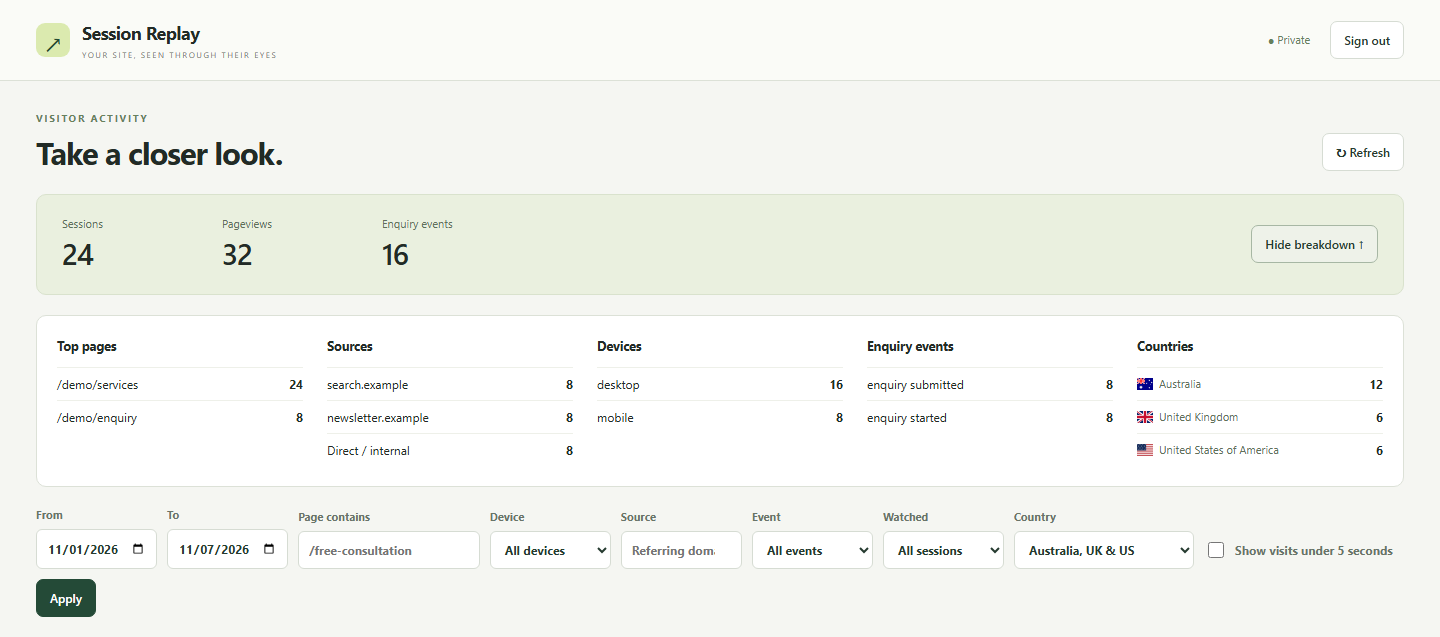
Sessions are visits, not a count of identifiable people. Enquiry events count configured actions, so a start and a submission can both contribute to the total. The default view includes visits lasting at least five seconds from Australia, the UK and the US. Shorter visits and unknown countries can be included using the controls; filtering does not delete recordings.
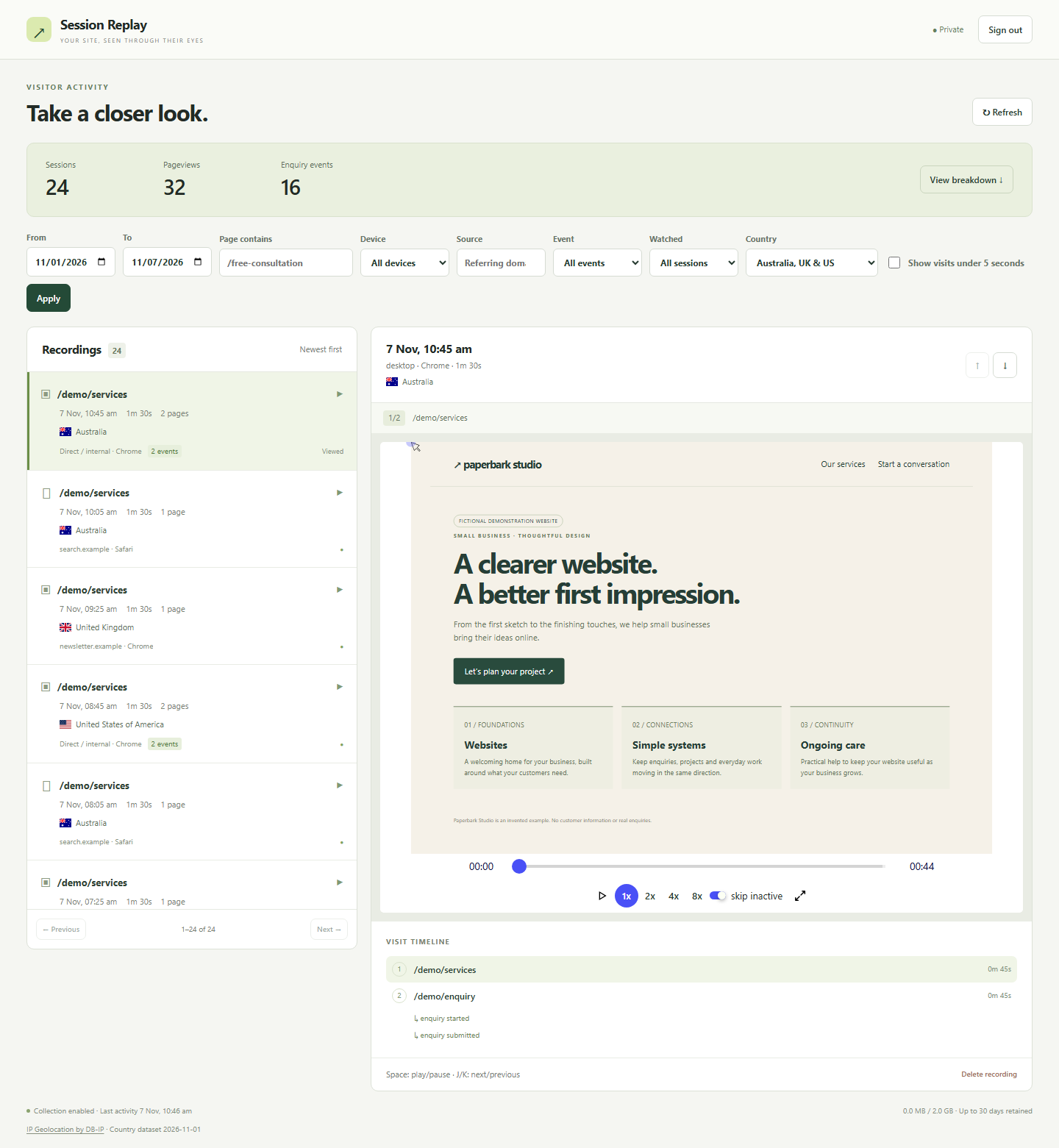
Selecting a visit opens its replay alongside the list. A timeline connects the pages and named events, so you can move from a service page to the point where an enquiry began. Playback speed, seeking and keyboard navigation make repeated review easier.
A small system with four clear parts.
Capture: rrweb records a DOM snapshot and subsequent changes. Our wrapper groups pages under a random per-tab visit ID, rotating after 30 minutes of inactivity. It filters events before queueing them and uploads numbered batches to a same-origin collector.
Collection: a start request receives a signed token scoped to its page. Batch requests carry that token, their sequence and events. The server validates origin, token, size and order; identical retries are acknowledged without storing a second copy. A missing batch is reported during playback.
Storage and review: compressed event batches stay in SQLite. A Vue dashboard calls authenticated PHP endpoints for summaries and session details, then loads one page segment into rrweb-player at a time. Playback uses a sandbox with scripts disabled.
| Record | What it holds |
|---|---|
sessions | Visit ID, start/last-seen times, device, browser, referring domain, country and watched state. |
pages | A visit’s ordered page segments: path, viewport, timing and completeness markers. |
batches | Compressed rrweb events, keyed by page and sequence, with a digest for retry checks. |
events | Allowlisted event name, page ID and timestamp. No free-form customer payload. |
Supporting tables hold rate limits and cleanup state. Country lookup uses a separate, locally imported DB-IP dataset; it does not make an external geolocation request for each visit. Missing country data remains unknown.
Decide what should never enter a recording.
Our recorder masks all input values and editable text, supports explicitly masked or blocked sections, strips URL queries and fragments, removes private data attributes, and excludes embedded frames and media. It does not capture console logs or network request bodies. Ordinary visible page text can still contain sensitive information, so private pages and sensitive regions need explicit exclusions.
Do Not Track, Global Privacy Control and a first-party opt-out stop capture. Administrator access is excluded from recording. Browser/device labels are coarse, sources keep only referring domains, and raw visitor IPs are not stored in the analytics database. Web-server access logs are a separate concern.
Recordings and configuration live outside the public document root. Administrator requests use a separate session cookie, login expiry and CSRF protection. The default limits are 30 days and 2 GiB of compressed recording data. Bounded cleanup runs during normal requests; optional maintenance drains the backlog and compacts storage.
Exit uploads are best effort. A short or partial recording is labelled accordingly, and elapsed visit duration is not proof of a human visitor. These limits are part of interpreting the tool, not just operating it.
Build something similar.
For our stack, start with Node 22.12+ for builds and PHP 8.3+ with PDO SQLite, zlib and sessions for the server. Bundle Vue and rrweb with Vite. Serve compiled assets and PHP entrypoints publicly; keep the runtime, configuration, password hash, database and session files in a private directory. Use HTTPS for deployment.
The examples below describe interfaces to implement in your own version. They are not a downloadable EasierIT application or a complete recorder.
The recording integration
This is the integration shape used by our wrapper. The imported module is your built recorder, and canRecord is your own allowlist of public pages. The server must separately allow the event name.
import { startRecording } from '/analytics/assets/tracker.js';

const replay = startRecording({
  endpoint: '/analytics/collect.php',
  basePath: '/analytics/',
  canRecord: () => ['/services', '/enquiry'].includes(location.pathname)
});

// Call when the enquiry genuinely starts; never attach form values.
replay.track('enquiry_started');
// Connect this to a visitor-facing opt-out control.
document.querySelector('#replay-opt-out')
  ?.addEventListener('click', () => replay.optOut());
Inside that wrapper, rrweb’s maskAllInputs, maskTextSelector and blockSelector are useful starting points. Apply sanitisation to snapshots and incremental events before they enter the upload queue. Filtering only the initial snapshot leaves later changes exposed.
A compact API boundary
| Request | Responsibility |
|---|---|
POST collect.php | action: start creates a page and returns its signed token; action: batch accepts numbered event uploads. |
GET api.php?action=auth | Return login state and a CSRF token. Login/logout are same-origin POST operations. |
GET api.php?action=sessionsGET api.php?action=summary | Apply the same filters to the paginated visit list, totals and all breakdowns. |
GET api.php?action=detail&id=…GET api.php?action=recording&id=… | Return one visit’s pages/events, then one page’s recording. Require administrator authentication. |
POST api.php?action=watchedPOST api.php?action=delete | Update watched state or delete a visit with authentication, origin and CSRF checks. |
For example, an authenticated request for api.php?action=sessions&countries=AU&min_duration_ms=5000&offset=0 selects Australian visits of at least five seconds. Send the same filters to summary. Keep database IDs opaque, validate every input, and return an explicit error rather than silently skipping a failed operation.
Read the building blocks
- rrweb source and recorder/player documentation — DOM capture and reconstruction; our checked-in packages use 2.2.0.
- Vue guide — reactive dashboard state and components.
- PHP PDO SQLite documentation — database access and transactions.
- DB-IP Country Lite — the optional local country dataset and its attribution terms.
A brief you can give your LLM.
Use this page as context and copy the brief below into your coding tool. Ask it to implement and verify each stage before adding the next.
Build a self-hosted website analytics and session replay tool for a small service business.
Reference: https://easierit.com.au/website-analytics.html

Use Vue 3 and Vite for the dashboard, rrweb/@rrweb/record and rrweb-player for DOM capture/playback, PHP 8.3+ with PDO SQLite, zlib and sessions for the server. Node 22.12+ is a build dependency only. Start with the rrweb 2.2.0 APIs used in this reference; verify compatibility if changing versions.
Sources: https://github.com/rrweb-io/rrweb
https://vuejs.org/guide/introduction.html
https://www.php.net/manual/en/ref.pdo-sqlite.php

Build in stages:
1. Create a private configuration, password-hashed administrator login, expiring HttpOnly session cookie, CSRF/origin checks, input validation and login throttling. Keep database, session files, secrets and server runtime outside the document root. Provide a local installer that refuses to overwrite existing data.
2. Model sessions (visit metadata), pages (session, path, viewport, timings, completeness), batches (page + sequence, digest, compressed events) and named events (page, name, timestamp). Add foreign keys, indexes and bounded cleanup state.
3. Implement a same-origin collector with start and batch actions, signed page tokens, ordered batches, duplicate-safe retries, request/page/session limits and explicit partial-recording status. Group pages using a random per-tab session ID; rotate after 30 minutes idle. Bound memory and retry attempts.
4. Wrap rrweb: mask all inputs/editable text; support masked and blocked sections; sanitise initial and incremental events before queueing. Strip URL queries/fragments and private attributes. Exclude private pages, administrator visits, iframe attachments, media, scripts, network bodies and console logs. Honour DNT, GPC and persistent opt-out. Allow custom event names only; no free-form payloads.
5. Provide authenticated auth, sessions, summary, detail, recording and status reads; login, logout, watched and delete writes with CSRF. Share date/page/device/source/event/watched/country/minimum-duration filters across list and summary; paginate 50 visits at a time.
6. Build overview totals and breakdowns, a selectable session list, sandboxed playback without scripts, page/event timeline, seeking, speed controls and mobile navigation. Stream one page segment at a time. Default to AU/GB/US visits of at least 5 seconds with controls for all/unknown countries and shorter visits. Country lookup is optional, local and approximate; missing data stays unknown, with no stored raw IPs.
7. Default to a maximum of 30 days and 2 GiB compressed data. Enforce logical expiry during reads, do bounded cleanup during requests and provide optional maintenance/backup instructions. Explain that failed exit uploads can leave partial sessions.

Acceptance: use fictional fixtures only. Verify masking in stored payloads including later DOM changes; opt-out/private-page exclusion; authentication/CSRF; retry deduplication and gap handling; filter consistency; expired-data exclusion; desktop/mobile playback and seeking; safe handling of scripts/iframes; usable empty/error states. Never import real visitor recordings. Document local setup, HTTPS deployment and limitations. A replay is usability evidence, not a statement of visitor intent or a count of unique people.